
Tuesday, November 13, 2012


Friday, November 9, 2012
File SAVE AS & Ejecting a Flash Drive
You have until the end of the period to turn in your keynote
- When you are done get one of the three flash-drives
- From INSIDE Keynote do a FILE SAVE AS and
- Change the name of your keynote to:
- SUBMIT - Block ? - Testimonio Keynote - First Lastname
- Eject the flash-drive properly and return the flash-drive to John and then log your keynote in at:
- NEXTWEEK you can make your keynote better before Thursday's grade!
Performing a File | Save AS


Two Way's to Eject a Drive


Thursday, November 8, 2012
Worktime...
REMINDER: This Keynote is NOT supposed to have automatic transitions!! You move the slideshow forward as you read your script
Agenda:

Extra Credit Presentations/Practices begin TODAY!
Agenda:
- Finish your Keynote! It is due NEXT CLASS, no exceptions.
- We have decided to work from PRINTED Scripts - ask me how! We'll print them today and tomorrow...

Extra Credit Presentations/Practices begin TODAY!
Sunday, November 4, 2012
First a few questions, then TESTIMONIO KEYNOTE!
NO TypingWeb today but we do have a short survey for you to complete about after-school programs. When you are done please get right to work on your keynote...
You have 4 classes to finish the entire thing.
Purpose: I can work productively and produce an average of 2 slides per class, every class, until November 9th.
Friday, November 2, 2012
Testimonio Keynote Workday Instruction

Your SCRIPT for EACH SLIDE is due
TODAY Friday, November 2nd
Purpose: I can work productively and produce an average of 2 slides per class, every class, until November 9th.
Some students did not turn in their FIRST Keynote yet!
CALENDAR
Your THEMES & THESIS were due last Friday, October 26th
Your FINISHED KEYNOTE is due the following Friday, November 9th
Re-Name Your Keynote!
DRAFT - Block ? - Testimonio Keynote - First Lastname
REMEMBER: Every SLIDE must have
an entry in your outline
an entry in your outline
with Theme, Slide, & Script
Example outline:
- Testimonio
- Theme 1 (what happened/what is "it" about?):
- Evidence (if not contained in theme):
- Slide (what will the audience SEE?):
- Script (what will the audience HEAR?):
- Theme 2:
- Evidence:
- Slide:
- Script:
Monday, October 29, 2012
Outline Template - 15 slides

Purpose: I can focus on my Testimonio Keynote, finishing my outline so that I can confidently begin working on my slides.
- CHANGE: TypingWeb LESSON
- (tests are now only on Fridays, thank you children for making me see the light)
- Themes & Thesis were due last Friday, 10/26/12
- If you have not done them or shared them do it now
- A complete skeleton of a "B" grade presentation outline [ new! and improved!] is included below the fold.
- To earn an "A" check the detailed requirements HERE.
- This week you will be working on a rotation of SLIDES and SCRIPTS.
- Change the name of your keynote to:
- DRAFT - Block ? - Testimonio Keynote - First Lastname
- If you know how you want a slide to look like you can describe that first
- If you know what you want your audience to hear then write that first.
- Either way, once one is done the other will be more apparent.
- Your outline, with COMPLETED SCRIPT FOR EACH SLIDE is DUE THIS FRIDAY, THE 2ND - The Day of the Homecoming Dance - Yay!
Friday, October 26, 2012
Testimonio Outline due today!
First off, in my opinion, do NOT got to the OSA haunted house!
If you told me it was CRAP I would have imagined
something a hundred times better than what I saw.
Not scary, poorly done, it blew giant chunks of mediocrity.
I sincerely hope this is not an indication of the quality of that school because THAT, my friends, would be truly scary!
Now:

Purpose: I will finish my outline (themes and thesis) and begin my Testimonio Keynote
Agenda:
- TypingWeb TEST
- Turn in Exhibition Invitation (1PT)
- Keynote WORK-TIME (Level 1 conversation)
Thursday, October 25, 2012
Keynote: Grouping, Layering & Pivoting [+screenshots]

Purpose: I will finish rough planning my project using my google doc outline and practice new Keynote skills
Agenda:
- Typing web
- Turn in Signed Testimonio Invitation (for 2PT)
- Testimonio example: Mariel
- Keynote skills: Grouping, Layering & Pivoting
- Grouping
- Layering
- Pivoting
- Screen-Shot Refresher [We usually use COMMAND+SHIFT+4 and then DRAG our desired area with the cross hair cursor]
- Work-time
- Finish Outline
- Identify Thesis
- Layout Keynote
- Work on Slides/Script
Tuesday, October 23, 2012
Outlining your Testimonio
Purpose: I will start planning my project using my google doc outline.
Agenda:
- Turn in Signed Testimonio Invitation (for 4PT)
- Typing web
- Testimonio example: Mia
- Outlining our Testimonios
- Workshop:
- Testimonio Outline (Google Doc)
Sunday, October 21, 2012
Testimonio Keynote: Project Description

Purpose: I will understand the Testimonio project requirements and start planning my project using an outline.
Agenda:
- Typing web
- Testimonio Parent Invitation
- Testimonio example: Gibran
- Testimonio Project Description
- Testimonio Outline (Google Doc)
Friday, October 19, 2012
Your 1st Keynote is due today!
No time for typing web today!
Today is a Keynote Work Day
Today is a Keynote Work Day
so open your keynote and start working!
========================
Your 1st Keynote is due today!
ALL Builds and Transitions MUST be
AUTOMATIC!
YOU MUST ALSO COMPRESS THE FILE
BEFORE YOU CAN
ALL Builds and Transitions MUST be
AUTOMATIC!
YOU MUST ALSO COMPRESS THE FILE
BEFORE YOU CAN
email it to John@envisionacademy.org
With the SUBJECT LINE:
Submit - Block ? - Me Keynote - First Lastname
RIGHT/COMMAND Click the keynote file and choose COMPRESS


RIGHT/COMMAND Click the keynote file and choose COMPRESS

SEND the ZIP file to John as an attatchment

Thursday, October 18, 2012
Keynote Work Day & SPLASH at Stanford
No time for typing web today!
Today is a Keynote Work Day
Today is a Keynote Work Day
so open your keynote and start working!
==========================================
After class starts we will pause a moment to look
at a great opportunity for EA students:
at a great opportunity for EA students:

EA is going to SPLASH on a bus on:
(JUST) Saturday, November 3rd
Meet @ EA at 8AM
Take fun classes from 10am-4pm
Return to EA @ ~5pm
Click as many squares as you wish when choosing class. Click the CIRCLE of the class you want the MOST!
Be sure to use your school email @envisionacademy.org when signing up.
You can use the school address if you need to:
1515 Webster St, Oakland, CA 94612
It is FREE! Even though the website say's it isn't, we gotcha' covered!
Splash Sign-up
(be sure to use your @envisionacademy.org address)
Just a sample of the over 100 classes taught @ Splash are listed below
Secret Agents: Tales of 20th Century Espionage
Learn to Create an Android App and Facebook Apps
The Secrets of Filmmaking
A Behind-the-Scenes Look at Sports Journalism
Quiddich for Muggles
Beat the Dealer: Blackjack card counting
Building a Mini Concrete Canoe
Introduction to Robotics
How to Write Your Own Screenplay
Socially Conscious Artists: Intelligent Hip Hop and Rap as Forces for Social Good
Why Hip Hop Matters
Improvisational Belly Dance
How Cars Work
Harry Potter Extravaganza
Introduction to Cryptography
Herpetology: aka Snakes and Lizards and Frogs, Oh My!
Threats to Coral Reef Ecosystems
Why are some species endangered?
Festivals of India
Creating a Start Up Business
How to Love
Achieve Your Goals - Lessons from the Hunger Games
Getting the Most Out of College
Poetic Improvisation
Drama: Improv!
Hip Hop Choreography
Drumming and Percussion
(be sure to use your @envisionacademy.org address)
Just a sample of the over 100 classes taught @ Splash are listed below
Secret Agents: Tales of 20th Century Espionage
Learn to Create an Android App and Facebook Apps
The Secrets of Filmmaking
A Behind-the-Scenes Look at Sports Journalism
Quiddich for Muggles
Beat the Dealer: Blackjack card counting
Building a Mini Concrete Canoe
Introduction to Robotics
How to Write Your Own Screenplay
Socially Conscious Artists: Intelligent Hip Hop and Rap as Forces for Social Good
Why Hip Hop Matters
Improvisational Belly Dance
How Cars Work
Harry Potter Extravaganza
Introduction to Cryptography
Herpetology: aka Snakes and Lizards and Frogs, Oh My!
Threats to Coral Reef Ecosystems
Why are some species endangered?
Festivals of India
Creating a Start Up Business
How to Love
Achieve Your Goals - Lessons from the Hunger Games
Getting the Most Out of College
Poetic Improvisation
Drama: Improv!
Hip Hop Choreography
Drumming and Percussion
Wednesday, October 17, 2012
Keynote: Sound Tracks and Sound Effects
No time for typing web today!
- Open Your ME Keynote and get working. We will pause for:
- Inserting a soundtrack
- inserting a sound on a page
Remember - Final ME Keynote is due FRIDAY - no exceptions
Soundtrack are a single sound (or other sound file)
that play across your ENTIRE slideshow.
Drag your sound file on to the Inspector's Document Audio TAB.
You can set the volume and loop values here too.

Soundtrack are a single sound (or other sound file)
that play across your ENTIRE slideshow.
Drag your sound file on to the Inspector's Document Audio TAB.
You can set the volume and loop values here too.


Tuesday, October 16, 2012
Keynote: animations; on a path; alpha channels; drop shadows]

Purpose: I can make a small but effective presentation using Keynote
Agenda
- TypingWeb.com
- Reviewing the calendar for Quarter 2
- Keynote
- Simple animations
- Animations on a path
- Alpha channels
- Drop shadows
- Font and Color guidelines
- HINT: The THEMES already have good fonts and colors so use them as guidelines
Animations
The order of the action is shown in the DRAWER
The order of the action is shown in the DRAWER


Animations on a Path
are just another ACTION on the BUILD INSPECTOR

Use a Mask to animate only PART of an image

Alpha Channel
Makes colors TRANSPARANT ! Works inside a MASK too!

Keynote: Project Due Dates for Quarter 2 (12-13)
Keynote Projects Due Dates for Quarter 2, 2012-13
- Thursday, October 18th
- Me Keynote EXTRA CREDIT Presentations begin
- Friday, October 19th
- Me Keynote EXTRA CREDIT Presentations continue
- ALL "ME" Keynotes Due (no late work credit - turn in what you have)
- Monday, October 22nd
- Testimonio Keynote project launch
- Testimonio Keynote work-time & Typing Web
- Testimonio Exhibition invitations go home (for credit on return)
- (4pts Tuesday, 3pts Weds, 2pts Thursday, 1pt Friday, Advisor calls home if not returned by Friday)
- Tuesday, October 23rd - Friday November 2nd
- Testimonio Keynote work-time & Typing Web
- Friday, November 2nd
- Testimonio Script Due
- Monday, November 5th - Thursday November 8th
- Testimonio Keynote DUE for EXTRA CREDIT
- (4pts Monday, 3pts Tuesday, 2pts Wednesday, 1pt Thursday)
- Testimonio Keynote dry run presentations for extra credit
- (4pts Monday, 3pts Tuesday, 2pts Wednesday, 1pt Thursday)
- Friday, November 9th
- Testimonio Keynote DUE for Normal Credit
- Monday, November 12th - Wednesday November 14th
- John is out of town - you have a sub. Do NOT expect help on technical issues.
- Work on refining Presentation Script & Practice Presentation
- Thursday, November 15th
- MANDATORY Exhibition for all 9th and 10th grade students
- 8:30AM Students bring NICE exhibition clothing in AM
- NO: CASUAL CLOTHING ( no t-shirts, no hoodies, no hats, no jeans, no raggedy anything)
- YES: PROFESSIONAL CLOTHING (button down shirts, nice sweaters, slacks, skirts, dresses, blouses, nice shoes, ties, etc...)
- When in doubt ASK! If not sure bring clothing (or a picture) in advance for approval. No exceptions.
- Students STAY at school after 5th period - DO NOT GO HOME
- 3:40-4:40 Students/Staff set-up rooms
- 4:45-5:30 Dinner Break
- 5:30-6:00 Students return, dress, freak-out
- 6:00PM Parents arrive

Tuesday, October 9, 2012
Conference Week Special Schedules and Locations
Special Schedule all week for all classes
9th Grade DLE schedule as follows:
When in the DLE Studio your purpose is to:
- Type your drafts for Facing History
- Continue to work on your "ME!" Keynote
- Thursday, 10/11
- P4: 8:30-9:25 in DLE Studio
- P5: 9:30-10:25 in DLE Studio
- P1:10:30-11:25 in the theater
- Advisory: 11:30-12:25 in the theater
- 1PM FAMILY CONFERENCES in DLE Studio
- Friday, 10/12
- P2: 8:30-9:25 [prep]
- P3: 9:30-10:25 in the theater
- P4:10:30-11:25 in the theater
- P5: 11:30-12:25 in the theater
- 1PM FAMILY CONFERENCES in DLE Studio
Friday, October 5, 2012
Keynote: downloading images; smart builds; simple animations


- Keynote 201
- Downloading images to your STUDENT FOLDER to use in your projects
- Smart Builds using images
- Simple animations
- Font and Color guidelines
- HINT: The THEMES already have good fonts and colors so use them as guidelines
Always DOWNLOAD the BIGGEST (highest quality) image you can and STORE IT IN THE STUDENT DRIVE before you use it in a project!


Smart Builds are preset animations specifically for images


Animations (The order of the action is shown in the DRAWER)
Wednesday, October 3, 2012
Testimonio Typing in Google Docs/Drive
AGENDA:


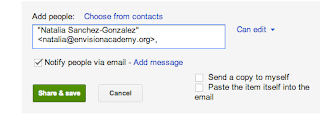

- Type your Testimonio Rough Draft (use DRAFT in the title while you are working on it. Change the title to SUBMIT when you want Natalia to review it.)
- Work on your Keynote (instructions on yesterday's blog)
- Quite school work or reading
Follow the format below...

Let the computer do the double spacing...

Share it with your teacher when done...


Now go work on your Keynote!
Check yesterday's blog for requirements
Subscribe to:
Posts (Atom)