Wednesday, March 5, 2014

Digital Photography: The Photo Walk

"[Photography] is an immediate sketch, done with intuition, 
and you can't [really] correct it..." 
Henri Cartier-Bresson


Typing web: NO

TWO DAY Learning Target(s):  I can IDENTIFY five major techniques of good digital photography by VIEWING exemplars and USING THEM when I take MY OWN PICTURES

Announcements: 
  • YOU must take pictures today and YOU must be able to explain WHY you took it and WHAT tip you used, if any
HOMEWORK:
  • NONE: You missed it
Agenda: 
  • Photowalk [100]
    • Rules [10]
      • You MUST be able to see JOHN @ ALL TIMES
      • You MAY NOT be more than 1/2 block away from John, who will try to walk in the middle of the pack
      • You MUST NOT CROSS ON RED.  I will give you an NC if you jaywalk.  Just wait for the green.  We will wait for you.
      • YOU must take pictures today and YOU must be able to explain WHY you took it and WHAT tip you used, if any
      • You MAY NOT go inside ANY business or building - we tried that yesterday and some "A" block kids don't seem to know what "no" means.
      • You may not sit on any cars, climb on any walls, or otherwise do anything but walk on the sidewalk unless John specifically tells YOU that you can.
        • Parkour is NOT on today's agenda
      • You MAY take a picture of anyone or anything you can see from outside
        • It is polite but not necessary to ask permission if you want to take someone's portrait.
        • If they are just "in the picture" and it isn't "of them" then permission is not necessary and will slow you down.
      • You MUST try to take a photograph that represents EACH of the tips you selected for yourself.
      • You are ENCOURAGED to leave your stuff in the Lab - the door will be locked.
    • Walk [90]
      • Approximate Route (1.9 Miles, 39 minutes walking without stopping to shoot pictures)

Tuesday, March 4, 2014

Digital Photography: The Basics [with links]

"[Photography] is an immediate sketch, done with intuition, and you can't [really] correct it..." 
Henri Cartier-Bresson
TWO DAY Learning Target(s):  I can IDENTIFY five major techniques of good digital photography by VIEWING exemplars and USING THEM when I take MY OWN PICTURES

Announcements: 
  • Next CLASS we go OUTSIDE to take pictures: You will have more fun if you have a fully charged camera or camera phone of your own.  You have less than 7 days to find one if you can!
  • Bring a raincoat to school and a plastic bag for your camera or phone... just in case.
  • We WILL modify our plans depending on the weather so don't trip...
HOMEWORK:
  • WRITE THIS IN YOUR PLANNER RIGHT NOW!
  • WRITE a ONE PARAGRAPH explanation of what the word "Community" means to you.  
    • You will turn this in to John as you walk in to the next class.
Agenda: 

Monday, March 3, 2014

Flappy Code

Hello!  Welcome to MONDAY!
Be nice to Ms. G & have fun coding!
You MUST have headphones to use the audio.  
Headphones are OK to use TODAY ONLY.

FIRST: If you did NOT do the "Day of Code" with John before then start learning the system by programing your own Angry Birds & Plants Vs. Zombies here: http://learn.code.org/hoc/1


NEXT: If you already did the "Day of Code" with John then you can jump right in with making your own version of Flappy Bird here:    http://learn.code.org/s/6/level/148


LAST: If you finish early you may do TypingWeb or continue working with the hour of code.  Poke around on the site or, if you are ready for a challenge, try making a 3-D Frogger game here: http://sgda.cs.colorado.edu/arcade/...hour_of_code

Friday, February 28, 2014

The minority report: What can/do we do?


Two Day Learning Target(s):  I can EXAMINE the social implications of DATA MINING by READING and ANNOTATING an article, engaging in a DISCUSSION, and exploring our own uses for such technologies.

Announcements: 
  • Next Week we go OUTSIDE to take pictures: You will have more fun if you have a fully charged camera or camera phone of your own.  You have less than 7 days to find one if you can!
Agenda: 
  • Typing TEST [07]
  • The Minority Report: Get out your reading and pull up your responses
    • THE DISCUSSION [30] - Cold Call with Socratic followups
      • What is DATA MINING?
      • What was the most important IDEA in the article? 
        • If your's was said already look for another "!" to tell us about.
      • What is the most important QUESTION you still have FROM or ABOUT the article? 
        • If your's was said already look for another "?" to tell us about.
      •  What do you AGREE WITH in the article? 
      •  What do you DIS-AGREE WITH in the article? 
    • THE NEXT STEPS [20]
      • What things about EA might we "figure out" if we had access to ALL of the DATA?
      • What things to we WANT to find out?
      • What DATA could we use?
      • How do we collect, store, manipulate, and MINE this data?
      • WHAT WILL WE DO?

Wednesday, February 26, 2014

The minority report: Chicago's new police computer predicts crimes, but is it racist?

Two Day Learning Target(s):  I can EXAMINE the social implications of DATA MINING by READING and ANNOTATING an article, engaging in a DISCUSSION, and exploring our own uses for such technologies.

Announcements: 
  • Martin & Music was GREAT!  You missed it [-2]
  • Next Week we go OUTSIDE to take pictures: You will have more fun if you have a fully charged camera or camera phone of your own.  You have less than 7 days to find one if you can!
  • DO NOT CLICK ON ANY OF THE LINKS.  THEY ARE INCLUDED FOR STUDENTS WHO MISS THE LESSON.
Agenda: 
  • Typing Web [15]
  • The Minority Report: Data Mining for justice and profit [10]
    • DO NOT CLICK ON ANY OF THE LINKS.  THEY ARE INCLUDED FOR STUDENTS WHO MISS THE LESSON.
    • THE FILM [5]
    • THE ARTICLE - reading closely for information and meaning [30]
      • Annotating with CODES (a new kind of TTTT)
        • Underline the most important words - not entire sentences
        • Put a CODE in the margin to show WHY you underlined those words
          • use "?" for things that you don't understand or are questioning
          • use "!" for things you think are important or well said
          • WRITE NOTES in the margin to explain your !'s and your ?'s
      • FROM THESE NOTES you will write a short response detailing:
        • What was the most important IDEA in the article? What is the ONE THING that stood out to you the most?
          • These are from your "!" annotations
        • What is the most important QUESTION you still have FROM or ABOUT the article? 
          • These are from your "?" annotations
        •  What do you AGREE WITH in the article? What is the ONE THING that MOST spoke to you as TRUE or REASONABLE?RequiredThese are from your comments and notes in the margin
          •  These are from your comments and notes in the margin
        •  What do you DIS-AGREE WITH in the article? What is the ONE THING that MOST spoke to you as FALSE or UN-REASONABLE?
          •  These are from your comments and notes in the margin
    • THE RESPONSE [10]
      • HAVE YOUR RESPONSE EMAILED TO YOU FOR THE DISCUSSION! 

    Tuesday, February 25, 2014

    Photoshop Wrap-up

    Learning Target(s):  I can assess my own work and the work of others using a rubric

    Announcements: 
    • Martin & Music - we might have extra seats: We leave EA at 4:30 to walk to the Oakland Museum
      • You should be picked up at 9PM
    • Next class we READ - a LOT: Bring your glasses
    • Next Week we go OUTSIDE to take pictures: You will have more fun if you have a fully charged camera or camera phone of your own.  You have less than 7 days to find one if you can!
    Agenda: 
    • Typing Web [10]
    • Assessing our work
      • Why do we assess/reflect?
        • Assessment/reflection helps us SORT and CEMENT in our minds the REASONS for our SUCCESSES and our SHORTCOMINGS
      • Who?
      • How?
      • GRADE?
        • You MUST review a minimum of FOUR other students' work.  
        • More than 4 is EXTRA CREDIT
        • If you do not get FOUR sent to you it is YOUR responsibility to get some sent to you.
      • IF THE FILE WON'T OPEN TRY THIS
        • Find the file in FINDER
        • SLOW click the FILENAME
        • ADD the EXTENSION .psd to the END of the file name and hit return/enter
        • CONFIRM that you want to ADD
    • Exit ticket
      • Did you see something that was better or worse than your own efforts?

    Friday, February 14, 2014

    PSA: Completion Day 3 of 3


    Learning Target(s):  

    • I can fine-tune and submit my Photoshop PSA project as a *.psd file
    Announcements: 

    • Have a SAFE vacation
    Homework: 
    • Extra credit: write a MEDIA (print ad, commercial, tv show, etc...) review using your Consuming Kids knowledge if you want some extra credit.
    Agenda: 
    • Typing Test
    • Photoshop PSA Technical Specifications 
      • YOU MUST MEET ALL SPECIFICATIONS to earn an "A"
      • CANVAS SIZE: 8.5 x 11 inches
        • The image must LOOK RIGHT printed 8.5x11 even if scaled
        • DO NOT MESS UP YOUR IMAGE.  BE CAREFUL WHEN YOU CHANGE CANVAS SIZE IF YOU HAVE NOT ALREADY DONE SO.  
      • MINIMUM COMPONENT IMAGES: Five
        • Each Component Image MUST BE ON ITS OWN LAYER
      • MINIMUM # OF LAYERS IN FINAL IMAGE: 5
        • Each component image must be on its own layer
    • Submit Your File in an EMAIL to John
      • FILE FORMAT: psd
        • you MUST send it in PSD format SO THAT I CAN SEE EACH INDIVIDUAL LAYER
        • Do NOT send this one as a jpg
      • FILE NAME: 
        • Submit-Block ?-PSA-First Lastname
      • ATTACH YOUR FILE TO THE EMAIL
        • You MAY need google drive to send it, that is ok
      • EMAIL TO: 
        • john@envisionacademy.org
      • SUBJECT LINE: 
        • Submit - Block ? - PSA - First Lastname
      • Body Text: Answer ALL of the following questions
        • Explain WHO your AUDIENCE is for this PSA
        • Explain what the SOCIAL ISSUE you are addressing is
        • GIVE YOURSELF TWO self grades
            • Technical Mastery 
              • How well did you use Photoshop for this PSA? Show me where you "did good" by referring to specific tools and specific layers
              • Here is where you can mention if you also helped others OR ran in to trouble OR had JOHN modify the requirements or specifications
            • Application of Knowledge
              • How well does your PSA address your social issue? Why?
    And now...


    Wednesday, February 12, 2014

    PSA: Completion Day 2 of 3

    Learning Target(s):  
    • I can complete my Photoshop PSA project in DRAFT FORM
     Announcements: 
    • Tobacco use is the leading preventable cause of death
      • 90% of smokers start before they are 18
        • if you never have another cigarette then damage reverses itself for the most part
        • If you don't start [OR STOP NOW] I can guarantee you will be healthier AND HAPPIER
        • CVS: Earnings Don’t Go Up In Smoke
    Homework: 
    • None
    Agenda: 
    • TypingWeb (10)
    • Photoshop PSA General Requirements
      • REMEMBER: Your PSA is supposed to benefit your community
      • It must be about a social issue
      • It must be in the form of an APPEAL - like an advertisement
      • You will be assessed on:
        • Emotional impact: would the reader be moved towards your cause?
        • Technical Specifications: Does it meet the requirements set out below?
        • Photoshop SKILL: Does it demonstrate your skills as a Photoshop artist?
        • Photoshop Technique: Is the PSA clean, with attention paid to the little details?  Was time taken to 'get it right'?
    • Yesterday's Blog with the rest of the specifications and examples can be found here.
    • And now...

    Tuesday, February 11, 2014

    PSA REQUIREMENTS & EXEMPLARS: Completion Day 1 of 3

    NO Typing Web Today - YES TOMORROW!
    Learning Target(s):  
    • I can complete at least TWO LAYERS in my Photoshop PSA project
     Announcements: 
    • Back to normal?
    Homework: 
    • none
    Agenda: 
    • Photoshop PSA General Requirements
      • REMEMBER: Your PSA is supposed to benefit your community
      • It must be about a social issue
      • It must be in the form of an APPEAL - like an advertisement
      • You will be assessed on:
        • Emotional impact: would the reader be moved towards your cause?
        • Technical Specifications: Does it meet the requirements set out below?
        • Photoshop SKILL: Does it demonstrate your skills as a Photoshop artist?
        • Photoshop Technique: Is the PSA clean, with attention paid to the little details?  Was time taken to 'get it right'?
    • Photoshop PSA Technical Specifications
      • CANVAS SIZE: 8.5 x 11 inches
        • The image must print 8.5x11 @ 100%
      • MINIMUM COMPONENT IMAGES: Five
        • Each Component Image MUST BE ON ITS OWN LAYER
      • MINIMUM # OF LAYERS IN FINAL IMAGE: 5
        • Each component image must be on its own layer
      • FILE FORMAT: psd
        • You will need google drive to send it
        • you must send it in PSD format SO THAT I CAN SEE EACH INDIVIDUAL LAYER
        • Do NOT send this one as a jpg
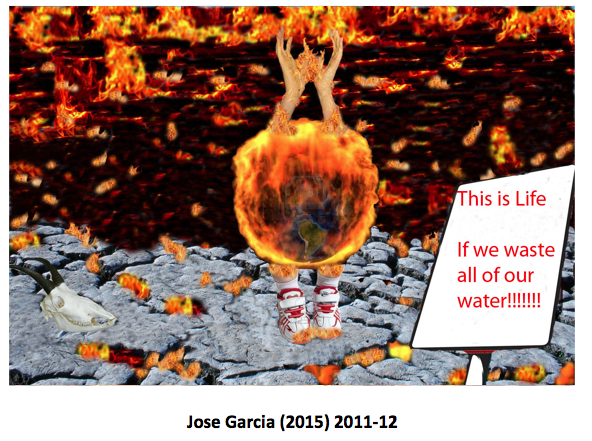
    • Photoshop PSA Examples: What do you see that is common among ALL of the strongest examples?


    Student Exemplars (similar assignment, different requirements)


    Your PSA(s) must be submitted by 
    FRIDAY, February 14th, St. Valentine's Day
    • EMAIL TO: 
      • john@envisionacademy.org
    • SUBJECT LINE: 
      • Submit - Block ? - PSA - First Lastname
    • Body Text: Answer ALL of the following questions
        • Explain WHO your AUDIENCE is for this PSA
          • Explain what the SOCIAL ISSUE you are addressing is
            • GIVE YOURSELF TWO self grades
                • Technical Mastery 
                  • How well did you use Photoshop for this PSA? Show me where you "did good" by referring to specific tools and specific layers
                • Application of Knowledge
                  • How well does your PSA address your social issue? Why?
          Remember to use all of your skills and reference how you used them in the reflection/email you send along with the PSD file.
          • Use ALL of your skills
            • Careful Selections
            • Proper use of Layers
            • Crop
            • Clone
            • Move
            • Marquis
            • Lasso
            • Content Aware
            • Patch
            • Healing Brushes
            • History Panel & Brushes
            • Liquify
            • Puppet Warp

          Monday, February 10, 2014

          Friday, February 7, 2014

          Career Day 2014!

          Career Day 2014!

          John

          Panel 1: Adam Lupinacci, Nick Silva, Nick Bishop, Omar San Cristobal

          (Their presentation is called “Working at 2K.”)

          Panel 2: Lauren Pitcher, Blanco Bismark, Kat Woolbright, Jose Padilla, Tarik Scott

          Panel 3: John Burris, Cheryl Amana, Lauren Sertich, Milton Reynolds

          Tuesday, February 4, 2014

          Consuming Kids and Martin & Music

          3rd=34
          4th=37
          5th=26
          1st=34
          IMPORTANT ANNOUNCEMENT
          Martin & Music Tuesday, February 25, 2014
          Concert @ Oakland Museum
          6:30 Doors
          7-9:00 Concert

          Youth Gathering BEFORE the concert (5pm? Food!) 
          Students from eight Bay Area schools from the Facing History Innovation Network meeting and planning next event

          Looking for youth leaders to meet throughout the school year with Civil Right's veterans leading up to a Bay Area Youth Justice forum in January of 2015. 

          Thursday, January 30, 2014

          Photoshop Practice Day 4: Typing TEST and Final Photoshop Turn In


          • Learning Target(s):  
            • I can MAKE CAREFUL SELECTIONS using the appropriate tools.
             Announcements: 
            • The work you send John TODAY will be HEAVILY WEIGHTED for your 3rd Quarter grade. Only submit your BEST WORK
            • TODAY is quiet work-time.
              • You may quietly and respectfully help each other, including being out of your chair, but if you start a conversation or do anything that isn't about the work, or bothers others, then you lose the right to help or be helped so don't blow it!
            • THE SCHEDULE NEXT WEEK HAS CHANGED
            Homework: 
            • Bring In Your Own Photos to Work On
            Agenda: 
            • TypingWeb TEST & Announcements [10]
            • Photoshop Practice time [40 or so]
                • TODAY: you WORK and then Email that work to john@envisionacademy.org
                • TODAY: You may do the following
                  • Work on ONE Photoshop picture - try and do one really well rather than 3 poorly. You MAY do more than one as long as EACH is your BEST WORK.
                    • Use ONLY pictures John has given you OR that John has approved. YOU MAY TRY TO CONTACT JOHN for approval. 510-684-3862
                  • Make very careful selections
                  • Be creative and experimental in what you choose to do and how you choose to manipulate the pictures
                • TODAY: You may also
                  • Download pictures for your PSA
                  • Brainstorm ideas for your PSA
                  • Begin assembling a rough draft of your PSA
                • TODAY:  you will
                  • COMPLETE your Photoshop work
                  • WRITE a reflection for each piece of work you submit justifying the effort and skill required to complete it.
                  • EMAIL that work (in ONE SINGLE EMAIL) to John as a representation of HOW MUCH YOU HAVE LEARNED (if you only did one piece of work send that, if you did more than one HIGH QUALITY PIECES of work send more than one USING MULTIPLE ATTACHMENTS)
                  • Receive a big, juicy grade for what you send.
                • TODAY YOU MAY NOT:
                  • Listen to music
                  • Play videos
                  • Be on a streaming site
                  • Eat or Drink
                  • Chat with your friends
                  • NOT try and become the BEST most CAREFUL Photoshop Artist you can possibly be.
          • Email The Results[10]
            • SAVE your file for your own later use: PhotoShop|Save|Format PSD (if first time saving)
            • "SAVE AS" each file as JPG: PhotoShop|Save As|Format JPEG
              • Quality=MAXIMUM (12)
            • ATTACH files to email: Use the Paperclip
              • Attach: JPG/JPEG ONLY 
              • If it says the file is TOO BIG then you have selected the WRONG FILE - do not send me the PSD file!
            • Write a reflection IN THE EMAIL for EACH photo attached : CLICK HERE FOR REFLECTION QUESTIONS
            • Email to: john@envisionacademy.org
            • Subject line: Submit - Block ? - PHOTOSHOP FRIDAY - First LastNAME

          Submit an online application to attend Envision Academy of Arts & Technology!


          Español?
          Click here for the Spanish language 
          online application.

          [NOTE: Google might try to TRANSLATE the page in to English - simply say NO]


          Click here for the English language 

          Wednesday, January 29, 2014

          Photoshop Practice Day 3: CAREFUL SELECTIONS & PSA Images

          Learning Target(s):  
          • I can MAKE CAREFUL SELECTIONS using the appropriate tools.
           Announcements: 
          • The work you send John on Friday will be HEAVILY WEIGHTED for your 3rd Quarter grade. Only submit your BEST WORK
          • These next two classes are quiet work-time.
            • You may quietly and respectfully help each other, including being out of your chair, but if you start a conversation or do anything that isn't about the work, or bothers others, then you lose the right to help or be helped so don't blow it!
          • THE SCHEDULE NEXT WEEK HAS CHANGED
          Homework: 
          • Bring In Your Own Photos to Work On
          Agenda: 
          • TypingWeb & Announcements [15]
          • Photoshop Practice time [80 or so]
            • TODAY: you WORK and then Fill Out an EXIT TICKET
              • TODAY: you do not have to send John anything
              • TODAY: You may do the following
                • Work on ONE Photoshop picture - try and do ONE really well rather than 3 poorly. You MAY do more than one as long as EACH is your BEST WORK.
                  • Use ONLY pictures John has given you OR that John has approved. YOU MAY TRY TO CONTACT JOHN for approval. 510-684-3862
                • Make very careful selections
                • Be creative in what you choose to do and how you choose to manipulate the pictures
              • TODAY: You may also
                • Download pictures for your PSA
                • Brainstorm ideas for your PSA
                • Begin assembling a rough draft of your PSA
              • TODAY YOU MAY NOT:
                • Listen to music
                • Play videos
                • Be on a streaming site
                • Eat or Drink
                • Chat with your friends
                • NOT try and become the BEST most CAREFUL Photoshop Artist you can possibly be.
              • FRIDAY:  you will
                • COMPLETE your Photoshop work
                • WRITE a reflection for each piece of work you submit justifying the effort and skill required to complete it.
                • EMAIL that work (in ONE SINGLE EMAIL) to John as a representation of HOW MUCH YOU HAVE LEARNED (if you only did one piece of work send that, if you did more than one HIGH QUALITY PIECES of work send more than one USING MULTIPLE ATTACHMENTS)
                • Receive a big, juicy grade for what you send.
          • Exit Ticket [05]

          Tuesday, January 28, 2014

          Photoshop Guided Practice Day 2: CAREFUL SELECTIONS & PSA Images

          Learning Target(s):  
          • I can MAKE CAREFUL SELECTIONS using the appropriate tools.
           Announcements: 
          • My Daughter is having surgery on Thursday so I will again be away Thursday & Friday - sorry.  I suck like the Raiders.
          Homework: 
          • Bring In Your Own Photos to Work On - see below for the rules on working on them.
          Agenda: 
          • TypingWeb & Announcements [15]
          • PSA Discussion & Brainstorm [20 or less]
          • Photoshop Practice time [20 or more]

            • Make a NEW LAYER!
            • Select some stuff!
            • QuickTrick
              • The Fuzzy Background
          • Exit Ticket [05]

          Monday, January 27, 2014

          Photoshop Guided Practice Day 1: CAREFUL SELECTIONS


          Learning Target(s):  
          • I can MAKE CAREFUL SELECTIONS using the appropriate tools.
           Announcements: 
          • WINTER BALL was a lot of fun. Can you guess what I did to each photo?
          • Weds/Friday you will be looking for more ideas/images for your PSA
          • Daughter is having surgery on Thursday so I will again be away Thursday & Friday - sorry.  I suck like the Raiders.
          Homework: 
          • Bring In Your Own Photos to Work On - see below for the rules on working on them.
          Agenda: 

            • Make a NEW LAYER!
            • Select some stuff!
            • QuickTrick
              • The Fuzzy Background
            • Swapping the faces
          • Exit Ticket [05]

          Friday, January 24, 2014

          SICK DAY III - Photoshop Practice


          Learning Target(s):  
          • I can DEMONSTRATE ALL of my PHOTOSHOP SKILLS using the appropriate tools.
           Announcements: 
          • TONIGHT!   Friday, January 24th, Winter Ball
          Homework: 
          • Bring In Your Own Photos to Work On - see below for the rules on working on them.
          Agenda: 
          • TypingWeb TEST [10 Minutes]
          • Photoshop PSA Photo Brainstorm Check
            • Pull up all FIVE images in Preview
          • Photoshop Practice check
            • Open your finest work from this week and, while you are waiting, keep working on something productive in Photoshop.
          • Exit Ticket [05]