Well hello there. During the pandemic we have transitioned away from teaching from this blog. Feel free to view the historical lessons.
Tuesday, January 5, 2021
Monday, August 24, 2020
Async Assignment 2 [U1L2]
Looking for Async Lesson #1? Click Here
This is Async #2 [Unit 1, Lesson 2]
How do I represent myself online?
Para leer esta página en español haga clic aquí
THE ASSIGNMENT
Think about the websites you discussed in class today. Each of them had a purpose and was created in a way to serve that purpose. What those websites shared online was on purpose and for a purpose.
Now, go look at any of your social media posts from the last year. (If you really don't have any social media posts email john@envisionacademy.org to ask what you should do).
By looking at only those posts what kind of person would someone think you are?
Happy?Sad?Angry?Helpful?Mean?Generous?Petty?
When you get to the form, you will write some of the adjectives you came up for the online "you"
On a piece of paper, write a short description of yourself, based only on your social media posts.
For example, I might write about myself: "I think John looks helpful, and he certainly shares and comments a lot about politics. He doesn't seem very religious, but he clearly cares about more than himself. He rarely seems to get angry but when he does it looks painful for the people he is mad at. He is funny sometimes but thinks he is funnier than he is."
Next, on the same piece of paper if you want, write a list of TEN THINGS
- Now you are trying to decide what things you are interested in, or care about, that you want to put online on purpose
- Some of these ideas might be for a serious purpose, like ending homelessness
- Some will be just because you like them
- And some will fit into both categories!
After thinking go to THIS FORM and put in your answers. Try to write complete sentences, with complete ideas.
Wednesday, August 19, 2020
Async Assignment 1 [M1L1]
Para leer esta página en español haga clic aquí
Hello and welcome to our new pandemical world of distance learning!
I'll explain the blog in more depth later but, in general, it is a quick and easy way for me to communicate my instructions and an easy place to go back and look if you are stuck!
This is our first Asynchronous assignment.
- This is an assignment that you do on your own
- It is DUE the night before your next live class (that should be Sunday, right?)
What you know from Sync class
- There are a lot of websites in the world
- There are a lot of them that people in the US never use
- Some of them we all seem to use
- Some of them nobody in this class use
What you are thinking about in this assignment
- Why do people use particular websites for particular things?
- Why do you go to the websites that YOU do?
- What do those websites do for you and how do they do it?
THE ASSIGNMENT
Think about the websites from the poll in class. (The list is at the bottom of this page**) you will write your answers on a form in a moment
[If you did not do the poll in class click HERE - bit.ly/DLE820 - before continuing]
Now, choose THREE of the websites below that you visit and ask yourself these questions.
- Why do I go there?
- What do I get from it?
- How are they giving it to me?
- What is the reason I go THERE and not some other similar website?
Now think about your favorite website (that is not one of the three you already chose and is also school appropriate) and ask yourself the same questions:
- Why do I go there?
- What do I get from it?
- How are they giving it to me?
- What is the reason I go THERE and not some other similar website?
After thinking go to THIS FORM and put in your answers. Try to write complete sentences, with complete ideas.
**The Curated List of US & Intl Websites**
Amazon: E-commerce and cloud computing
Apple.com: Online shopping & tech support
Baidu: Internet-related services and products
Bing: Web search engine
Blogspot/Blogger: Blogging
CNN: News
eBay: Online auctions and shopping
Facebook: Social networking
Google: Internet services and products
Haosou: Internet security and web search engine
Instagram: Photo sharing and social media
Jingdong Mall: Online shopping
Linked in: Social networking
Microsoft Office: Online office suite
Microsoft Online: Software
Microsoft: Software and technology
Netflix: Streaming TV and movies
Okezone [id]: Portal
Reddit: Social news and entertainment
Sina Weibo: Social networking
Sohu: Portal
Stack Overflow: Question and answer site
Taobao: Online shopping
Tencent QQ: Portal
Twitch: Streaming primarily on video games
Twitter: Social networking
Walmart: Online shopping
Wikipedia: Encyclopedia
Windows Live: Software plus services
Xinhua News Agency: News
Yahoo!: Portal and media
YouTube: Video sharing
Zillow: Real Estate
Zoom Video Communications: Videotelephony
Bored..?
Listen to this!
Monday, June 8, 2020
WK 6/8 | Google Sites | Academic Portfolio [WORK WEEK]
Hello and Welcome to DLE Distance Learning
Week Thirteen of Shelter In Place
This week:
- This week we will complete the portfolio portion of the website that you will use next year to collect and present work from ALL of your classes
- All work is due this Wednesday, the 10th
- All Powerschool Semester 2 grades are up to date - if you feel your grade is too low contact me by this FRIDAY
Step 1:
Think about each class this year and ask yourself these questions:
- What work am I most proud of?
- What work do I have examples of online already?
- What work do I have that I could PUT online in the next 2 weeks?
Any work that you are proud of and that
you actually have a copy of is likely
something you should use in this Portfolio!
Step 2:
Choose one class and one piece of work and
design a web page, using all of your resources,
design a web page, using all of your resources,
to display that classwork
Step 3:
Select ANOTHER class and piece of work and repeat
Over the next 2 weeks do ALL class Portfolio pages
& complete all existing pages
& complete all existing pages
Step 4:
EACH time you complete a page
EACH time you complete a page
ALL Portfolio Pages are due Wednesday June 10th
Monday, June 1, 2020
WK 6/1 | Google Sites | Academic Portfolio [9 of 9]
Hello and Welcome to DLE Distance Learning
Week Twelve of Shelter In Place
This week:
- This week we will continue to create the portfolio portion of the website that you will use next year to collect and present work from ALL of your classes
- All three live classes this week will work through the creation of this final piece of the website
Step 1:
Think about each class this year and ask yourself these questions:
- What work am I most proud of?
- What work do I have examples of online already?
- What work do I have that I could PUT online in the next 2 weeks?
Any work that you are proud of and that
you actually have a copy of is likely
something you should use in this Portfolio!
Step 2:
Choose one class and one piece of work and
design a web page, using all of your resources,
design a web page, using all of your resources,
to display that classwork
Step 3:
Select ANOTHER class and piece of work and repeat
Over the next 2 weeks do ALL class Portfolio pages
& complete all existing pages
& complete all existing pages
Step 4:
EACH time you complete a page
EACH time you complete a page
ALL Portfolio Pages are due Wednesday June 10th
Tuesday, May 26, 2020
WK 5/25 | Google Sites | Academic Portfolio [8 of 9]
Hello and Welcome to DLE Distance Learning
Week Eleven of Shelter In Place
This week:
- This week we will continue to create the portfolio portion of the website that you will use next year to collect and present work from ALL of your classes
- All three live classes this week will work through the creation of this final piece of the website
Step 1:
Think about each class this year and ask yourself these questions:
- What work am I most proud of?
- What work do I have examples of online already?
- What work do I have that I could PUT online in the next 2 weeks?
Any work that you are proud of and that
you actually have a copy of is likely
something you should use in this Portfolio!
Step 2:
Choose one class and one piece of work and
design a web page, using all of your resources,
design a web page, using all of your resources,
to display that classwork
Step 3:
Select ANOTHER class and piece of work and repeat
Over the next 2 weeks do ALL class Portfolio pages
& complete all existing pages
& complete all existing pages
Step 4:
EACH time you complete a page
EACH time you complete a page
ALL Portfolio Pages are due Wednesday June 10th
Monday, May 18, 2020
WK 5/18 | Google Sites | Academic Portfolio [7 of X]
Hello and Welcome to DLE Distance Learning
Week Ten of Shelter In Place
This week:
- This week we will begin to create the portfolio portion of the website that you will use next year to collect and present work from ALL of your classes
- All three live classes this week will work through the creation of this final piece of the website
- Tuesday's class at 2 will be recorded
Step 1:
Create a Top Level Page for all of your portfolio work
 |
Step 2:
Add a sub-page for each of your classes

You will do this each year,
one for each class

Step 3:
Check your work and then PUBLISH
⬇️ It should look like this ⬇️

Step 5:
Select ONE Class & choose the ONE BEST piece of work
you have done in that class all year.
Step 6:
Design a web page, using all of your resources,
to display that classwork
Step 7:
Select ANOTHER class and piece of work and repeat
Over the next 3 weeks do ALL class Portfolio pages
& complete all existing pages
& complete all existing pages
ALL web work is due Wednesday June 10th
Optional but interesting
- On the Media:
Communication Breakdown May 15, 2020
Tuesday, May 12, 2020
WK 5/11 | Google Sites | Catch-Up Week [6 of X]
Hello and Welcome to DLE Distance Learning
This week:
- This week we will pause and catch-up on all missing website work.
- Live Classes & Office Hours this week will focus on BASICS for students who are just beginning.
Announcements/Resources/Learning Targets are @ the END of the blog now
Use the LINKS on the RIGHT
To locate the week you need to start
To locate the week you need to start
- Week 1: Create the site and initial home page
- Week 2: Create the My(video) Life page
- Week 3: Create the I AM Virus page
- Week 4: Add to your home page
- Week 5: Create the Covid Conspiracy page
- NOTE: Turn in Link for Week 5 is HERE
COME to "Class" or Office Hours for HELP!
Announcements:
- Always look at the calendar HERE for the most current schedule each week!
- You must attend one live learning experience per week per class
- Friday Office hours no longer exist. Instead email John for a 1-on-1, especially if you are just getting started
Resources:

Monday, May 4, 2020
WK 4/4 | Google Sites | Covid Conspiracies [5 of X]
Hello and Welcome to DLE Distance Learning
This week:
- This week we will be continuing our Web Publishing unit by examining the Covid-19 Pandemic through the lens of Scams, Villains, Conspiracy Theories, or Misinformation (SVCM) and create an informational page to educate and warn our visitors.
Announcements/Resources/Learning Targets are @ the END of the blog now
Work Order for this week
Step ONE: Explore & Collect Information
- TASK 1: Listen to the podcast Skeptic Check: Covid Conspiracy
- You need this podcast's information or else independent research to do this week's web page
- Take notes about the scams they are talking about.
- What is the Scam, Villain, Conspiracy Theory, or Misinformation (SVCM) that they are talking about? ?
- Who is falling for it?
- WHY are they falling for it? What "makes sense" about it?
- Is there anything than can or did STOP this scam?
- You must find a minimum of FOUR different SVCM's
- You must find at least ONE SVCM of each type [Scams, Villains, Conspiracy Theories, or Misinformation]
- You must find at least one SVCM in each segment of the podcast
- Find at least one SVCM in each of the segments:
Part 1: Joan Donovan - Pandemic Opportunists
Part 2: Joan Donovan - The 5G Conspiracy
Part 3: Whitney Phillips - The Gates Gambit
Part 4: Whitney Phillips - Conspiracies Abound!
- DUE: Mother's Day. Sunday 5/10/20 at NOON
- If you haven't created your Digital Portfolio site click HERE and complete STEP THREE before you return to compete this week's work
- TASK:
- Create a CV-19 SCAMS page on your digital Portfolio site
- If you didn't listen to the Podcast above you will need to research current Scams, Villains, Conspiracy Theories, or Misinformation about the pandemic
- Requirements:
COME to "Class" or Office Hours for HELP!
Announcements:
- Always look at the calendar HERE for the most current schedule each week!
- You must attend one live learning experience per week per class
- Friday Office hours no longer exist. Instead email John for a 1-on-1, especially if you are just getting started
Resources:
Weekly Learning Targets:
- I will better understand how media we post online can be used to identify and locate us
- I can choose which information to put on the internet myself
- I can reflect those choice on my Personal Digital Portfolio
Monday, April 27, 2020
WK 4/27 | Google Sites | Refining the Home page [4 of X]
Hello and Welcome to
DLE Distance Learning
DLE Distance Learning
This week:
- This week we will be continuing our Web Publishing unit. We will learn how people expose their personal information without meaning to and we will both Improve our front page and begin to decide which personal information we will share on our Portfolio pages
- Always look at the calendar HERE for the most current schedule each week!
- You must attend one live learning experience per week per class
- Friday Office hours no longer exist. Instead email John for a 1-on-1, especially if you are just getting started
Resources:
Weekly Learning Targets:
- I will better understand how media we post online can be used to identify and locate us
- I can choose which information to put on the internet myself
- I can reflect those choice on my Personal Digital Portfolio
Work Order for this week
Step ONE: Explore & Reflect
- DUE: BEFORE whatever ZOOM you attend this week
- TASK 1: Watch episode one of "Don't F**k with cats: Hunting an Internet Killer"
- WARNING: This show contains information about animal abuse but it does not show any directly and it is about catching the person who did it.
- The show is fascinating and fun but it does have disturbing moments and you are not required to watch it to complete the assignment.
- You can watch it on Netflix here or
- You can watch it via Google Drive here (con subtítulos en español)
- You do NOT need to take notes
- You only need to watch Episode One
- If you are NOT watching the episode continue to Task 2
- Task 2: Read about the technology used in the show to "catch the killer"
- Think about the following questions while you read (link at end)
- What information do you have posted online?
- Is it public to the world or are your accounts private?
- Do you trust everyone who is your "friend" on your private accounts.
- What information do you think a stalker/private eye could find about you from your social media postings?
- Now Click Here & Read: "How a Photo's Hidden 'Exif' Data Exposes Your Personal Information"
- Task 3: Stalk yourself
- Use the following tools from the movie to see if you can find out your own name and location from your photo's EXIF data and reverse image search.
- FIRST: Let's practice with a few images from John
- Use TinEye (Reverse Image Search) to search all three pictures below and then answer these questions
- Which landscape picture was plagiarized from the web?
- What is that man's name?
- Step-By-Step instructions are BELOW if you need them
- Click HERE for the Google form to record your answers
- Click HERE for TinEye
- Pic 2 Map (Photo Location & Online EXIF Data Viewer) doesn't work with these pictures below but it will with the ones on your phone!
- Click HERE for Pic2Map
- NEXT: Find a few digital photos of yourself (if you can)
- Find one near school
- Find one near home
- Find one on vacation
- Use the two tools above to search your own images
- Can you find your own name just from a photo of yourself from social media?
- Can you find out where your photos were taken?
- Could someone find your schools?
- Could someone find your block?
- Could someone find you?
- Bring whatever information you find to Class or Office Hours this week and TELL JOHN for CREDIT


- DUE: Sunday 5/03/20 at NOON
- If you didn't create your Digital Portfolio site last week click HERE and complete STEP THREE before you return to compete this week's work
- TASK:
- You are going to fix up the MAIN or LANDING page of your Digital Portfolio
- Requirements: Use the example sites for inspiration
- Include a minimum of one professional looking picture of yourself
- take it now if you need to
- Expand your writing to a FULL PARAGRAPH about yourself - you can be personal or purely professional but everything must be school appropriate
- FOUR FILLED BUTTONS - arranged attractively on the page with your paragraph and picture.
- ONE that links to the EA Website (can you find the site? Can you make a button that does there?)
- A second one that links to the the class of 2023 distance learning site
- A third button that links to the DLE class site
- A final one that links to John's Blog
- ONE OTHER element of your own choosing
- Image
- text
- or ????
- Process:
- Remember to return to this page and check the requirements before you submit your URL
- Go to https://sites.google.com and open the site you created last week.
- Go to the video tutorial page and watch Improve a page: Making the home page better
- Check the Requirements record your URL HERE when you are finished.
COME to Office Hours for HELP!
Monday, April 20, 2020
WK 4/20 | Google Sites | I AM Virus [3 of X]
Hello and Welcome to
DLE Distance Learning
DLE Distance Learning
NO new work required until
after Class on Wednesday:
IF BEHIND:
use Archive on right side of this blog to go to Week One and start the Google sites "Digital Portfolio" portion of the lessons so far.
This week:
- This week we will be continuing our Web Publishing unit. We will add a page detailing our "AM" during the Plague times
- If you want to get started think about writing an "I am" poem but only about your "coronavirus" life (click HERE for examples)
- Always look at the calendar HERE for the most current schedule each week!
- You must attend one live learning experience per week per class
Resources:
Weekly Learning Targets:
- I will do some reflective writing and post it publicly on my Digital Portfolio as a Coronavirus Experiences Page
Work Order for this week
Step ONE:
Step Two: Adding a reflective page
Do ALL Outstanding Google sites assignments
Step Two: Adding a reflective page
- DUE: Sunday 4/26/20 at 11:59PM
- NOTE: If you have NOT complete the previous week's Google Sites work before you continue with this page and come to office hours to catch up.
- TASK 1:
- You are going to create a personal "I AM" Virus Page
- Requirements:
- One page, on your Digital Portfolio site and included in the site navigation.
- Title the page appropriately
- Write a minimum of THREE (3) paragraphs that tell some sort of TRUE story about your current shelter in place life
- Only write about your life AFTER March 13th of this year!
- Choose on of these three formats or get approval for an idea of your own
- “I AM” Poem constrained to the Shelter in Place days ( click HERE for examples of I AM poems)
- Be a reporter and write an Article about living your life while sheltering in place
- Write a letter to a really good friend/penpal who lives in a place where they do not know about CV-19 or the Deaths or staying inside or anything
- + Propose something!
- Process:
- Go to https://sites.google.com and open the site you created last week.
- Use the same ADD PAGE process from last week's lessons
- PASTE the URL onto this form and you are done for the week! ALL CREDIT will be assigned via this form!
Monday, April 13, 2020
WK 4/13 | Google Sites | My [video] Life [2 of X]
Hello and Welcome to
DLE Distance Learning
DLE Distance Learning
This week:
- This week we will be continuing our Web Publishing unit. We will look at how the Class of 2023 Distance Learning site is designed and use that knowledge to help understand some of the organization and design decisions that go into making usable and appealing websites. We will then apply those design lessons to our own Digital Portfolio
- We have changed up the schedule this week to pay attention!
- You must attend one live learning experience per week per class
Resources:
Weekly Learning Targets:
- I will understand how websites are organized in branching outlines/flow charts & post that understanding on Padlet
- I will design the outline of my Digital Portfolio in Google Docs
- I will add a personal video page to my online Digital Portfolio
Work Order for this week
Step ONE: Reflect & Explore
- DUE: Wednesday 4/15/20 at NOON
- TASK 1: Go to https://envision.padlet.org and log in with Google


- Look for a Padlet called Website Outlines

- Look for John's Post and read the text and look at the picture, then come back here


- TASK 2:
- Get a piece of paper, a pencil, and an eraser if you have one
- Go to the Class of 2023 Distance Learning site and draw an outline/flowchart of ALL the INTERNAL LINKS on the site.
- Here's how
- LOOK AT THE EXAMPLE PICTURE THAT I POSTED ON PADLET: See how I outlined PART of the website there? (hint, hint)
- Your goal is to MAP all of the structure of the Class of 2023 site
- You stop when a link leaves the site (like when the link takes you to my BLOG - see the example picture I posted in the Padlet)
- Look at these two example pictures as well, they show two more website outlines


- TASK 3: Go back to Padlet and make your own post with a paragraph and a picture!
- https://envision.padlet.org
- log in again with Google if you need to
- Hover over the + in the lower right and ADD your own post
- TITLE the post with your full name (yes, even though it already shows)
- Go back and look at the home page for the Class of 2023 Distance Learning site
- On your Padlet Post write a paragraph or more about the 2023 HOME page
- What do you see there?
- WHY are THOSE things put THERE?
- What is the home page trying to do?
- Does the front page do what it needs to do?
- How might it be better?
- ADD A PICTURE TO THE POST
- Click the camera icon in your posts's editing box and hold your Website Outline up to the camera - try and get the ENTIRE drawing in the picture.

- POST YOUR POST AND YOU ARE DONE UNTIL LIVE CLASS TIME!

- DUE: Friday 4/17/20 at 11:59PM
- If you didn't create your Digital Portfolio site last week click HERE and complete STEP THREE before you return to compete this week's work
- TASK 1:
- You are going to create a personal My (music) Video Page
- This page is your musical video life as told through curated Youtube music videos
- ONLY YouTube music videos - do NOT upload any of your own videos at this point
- Requirements:
- One page, on your Digital Portfolio site and included in the site navigation.
- Title the page appropriately
- Include a minimum of NINE (9) music videos that tell some sort of story about your life
- It can be chronological; "This was my favorite song in 1st grade, 2nd grade, etc..."
- It can be by topic; "This was my angry phase, this was my artistic phase, this was my K-Pop phase"
- It can be arranged any way you want as long as it is EASY to understand WHY each video was chosen to represent you.
- Be certain to explain BOTH why each video was included and how they relate to each other and explain something about YOU.
- Use THIS PAGE as an example of what you are trying to do
- READ what I wrote - most of the text is designed to help you create a unique design of your own.
- LOOK at what I did, then look at the design tools and figure it out!
- Process:
- Go to https://sites.google.com and open the site you created last week.
- Use the edit button to go into Edit Mode

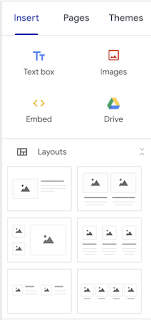
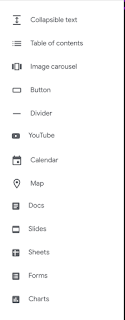
- On the RIGHT you should see most of the TOOLS

- Switch to the PAGES Tab and find the New Page button on the BOTTOM RIGHT

- HOVER over the + and look at your choices, then choose PAGE (this is the default action for this button)

- NAME the Page APPROPRIATELY

- When you say DONE it will create the page and put it by default in the Navigation


- SWITCH back to the INSERT Tab

- And look for the Layout Template that looks like this

- When you click it you will get a full sized version on your page (you can move them around later if they are in the "wrong" place)

- Click the + to search for your YouTube videos


- Click the one you want and then hit SELECT (PRO-TIP, search up the exact version of your video FIRST on the full YouTube site - it can be hard to see which version you are really getting when you just use the this box)

- If you Click on the video you get some Settings

- And when you click on the TEXT BOXES you can change the text

- See where it says "Heading" or perhaps "Normal Text" above where you are typing? That is the way to have consistent formatting of text color and size throughout your site (and it is changed when you change the CSS by choosing a THEME - more on that later)
- Once you are done working for the moment - even if you are not finished - you need to PUBLISH your site so that you don't lose your work.
- You did this last time - look for the PUBLISH button and hit the ARROW next to it

- Select REVIEW CHANGES which is the default for this button (I think)
- Your screen will look something like this the first time you publish a page

- If all is well (and you can undo later if you need to) hit PUBLISH again

- Now VIEW YOUR PUBLISHED SITE

- COPY the URL

- PASTE the URL onto this form and you are done for the week! ALL CREDIT will be assigned via this form!


COME to Office Hours for HELP!
Subscribe to:
Posts (Atom)